A customer running Horizon with Windows 10 recently inquired about performing in-place upgrades on their templates. Typically, I would recommend building a new template for a major OS upgrade; there’s often many GBs’ worth of redundant bloat that remains dormant in the file system after an in-place upgrade.This can be detrimental for storage, performance, and general housekeeping of the desktop image.
On this occasion, a new template build wasn’t feasible, so we had to go in-place.
Before starting, clone the VM and test the process first. It’s easy to break Windows 10 if firmware or BIOS settings are misconfigured in vCenter. The following steps assume prerequisites for Windows 11 are already in place, including a native key provider configured in vCenter.
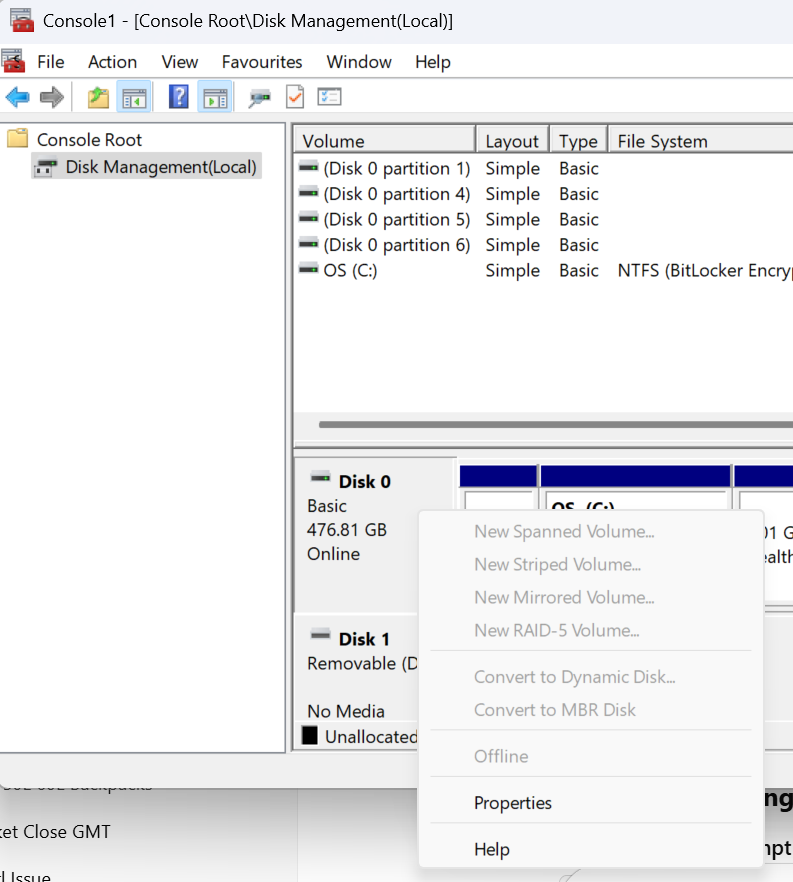
For background information on vTPM in vSphere I recommend the Q&A on vTPM from VMware and the Broadcom guidance; albeit the latter doesn’t explain the disk partition issue covered below, so take this into consideration before proceeding.
Environment: VMware Cloud on AWS
Scale: This process is for a single VM and doesn’t cover automated/batch upgrading.
Operating System: Windows 10 Enterprise 22H2 to Windows 11 24H2.
4. Once the partition type has been converted successfully, shut down the VM. vTPM devices and boot/firmware configuration changes can only be performed on powered-off machines.
5. Configure secure boot on the VM by browsing vCenter > select the VM > Edit Settings > VM Options > Boot Options and set the Firmware: EFI and Secure Boot: Enable > Save.
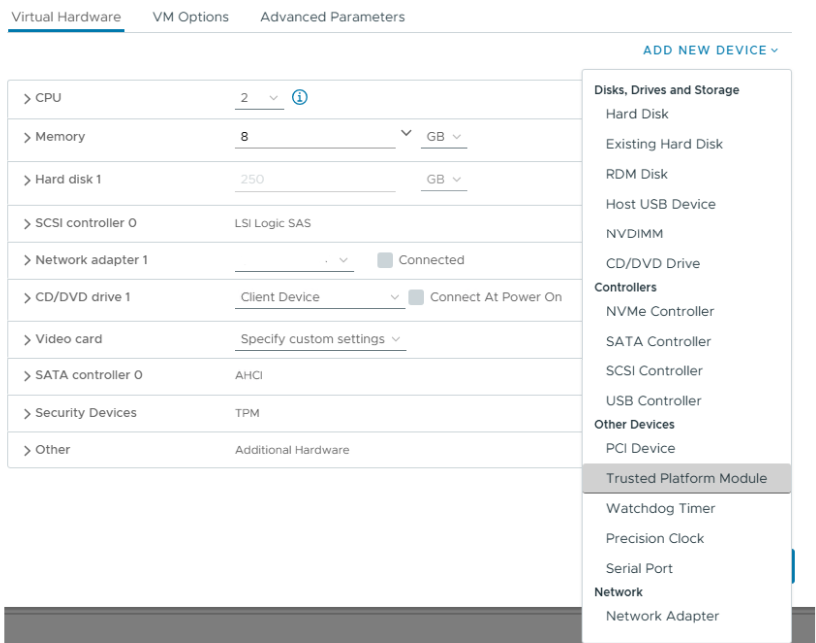
6. To add a vTPM device Virtual Hardware > New Device > Trusted Platform Module. The vTPM will add to the VM and you can see the default VMCA-provided certificates are pre-populated. No further steps are needed.
7. At this point the vTPM configuration is in place and the VM is ready to upgrade to Windows 11.
I decided to run the Windows 11 installation assistant to validate the machine configuration, and after the validation the wizard will automatically progress to an online upgrade to Windows 11 at the same build (Enterprise/Professional) as your existing installation.
Don’t forget to run Omnissa OSOT tool if you plan to use the virtual machine as an Horizon template.
This is a commonly encountered issue with Aria for Logs and although the guidance from Broadcom helps, there isn’t a permanent solution provided and this is where I make use of a Cron job.
What’s a cron job?
Cronjob is the Linux equivalent of a Windows scheduled task. It can be used to automate any action that can be performed within the OS.
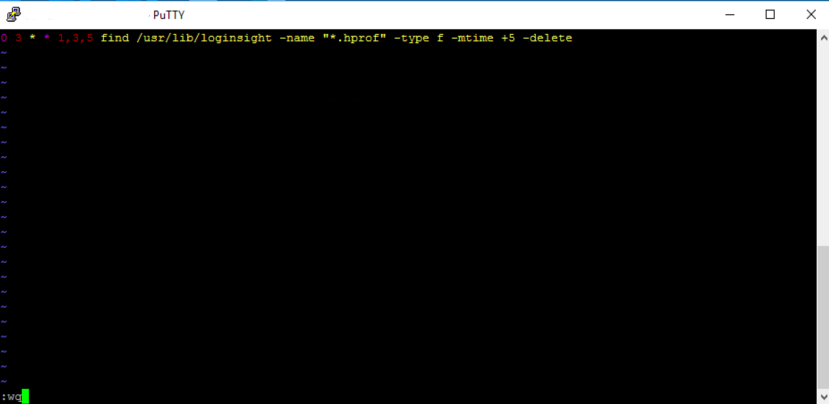
I use the Crontab.guru expression scheduler to help create the schedule for what it is I want to do and then put the job into the local machines cronjob list.
Configuring a cron jobto remove .hprof files
The syntax for the job is below and this invoke a task to search for .hprof files in /usr/lib/loginsight every Mon/Wed/Fri and then delete any that are older than 5 days.
I wanted to share the maintenance procedure I used recently for a customer. We needed to power down their Horizon workload clusters and gracefully place all instant clone desktops into a maintenance state. I wasn’t aware of the vSAN Shutdown Cluster wizard feature and the magic that it performs. It saved me a lot of time. Several of my colleagues weren’t aware of the feature either. I’ve shared the process below.
The next steps explain how to power off instant clone pools, desktops, vCenter, and parent VMs. The process assumes all user sessions can be logged off and the pod will be unavailable. This is useful if you need to undertake cluster maintenance requiring a total power down of all ESXi hosts and Horizon workloads.
Log off any active user sessions
via Horizon Admin console > Sessions > select all available sessions > Logoff Session. Await completion and make sure no active sessions are in use.
Place all desktop pools into Disabled state:
via Horizon Admin console, select Desktops > select all pools > Disable Desktop Pools.
At this point, all desktop pools are unavailable for use and there are no users logged onto the platform.
The next step is to disable the Parent VMs. Although this step is optional, I include it here for awareness. From my testing, I found it prevented the instant clone VM’s from rebuilding when you shut them down.
Disable Parent VMs
via Horizon Admin console > Servers > select the vCenter instant > More > Disable ParentVMs.
This next step prepares the Horizon agent for powering off on an instant clone.
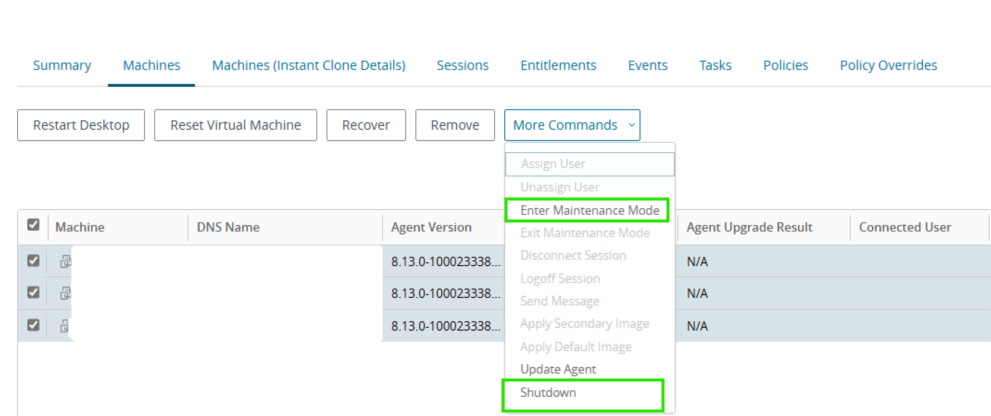
Place all instant clone pool desktops into maintenance mode
Select Desktops > target pool > Machines > select all > More Commands > Enter Maintenance Mode
By disabling provisioning, we avoid any new machines being rebuilt and generating problem VMs. We then power off all Horizon-managed VMs and the cluster hosts, and vSAN can be prepared for power down.
Disable provisioning on all pools:
via Horizon Admin Console > Desktops > select all pools > Disable Provisioning.
Shutdown all instant clone pool VMs
Select Desktops > target pool > Machines > select all > More Commands >Shutdown. Monitor the progress in vCenter.
At this stage, all Horizon desktops and RDS hosts should be powered off, with vCenter performing no provisioning or Horizon-related actions.
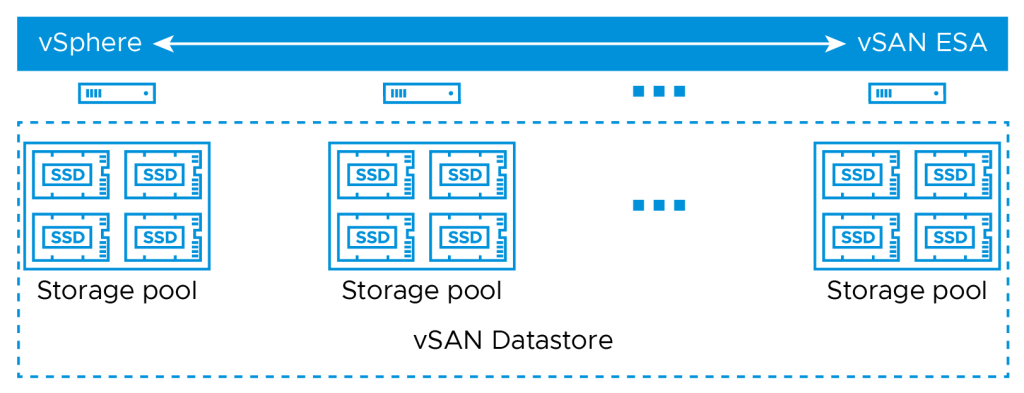
We can now continue with preparing the vSAN cluster and all hosts to shut down. The shutdown wizard will:
Turn off HA
Power off all system VMs
Disable cluster member updates from vCenter for all hosts in the cluster
Pause state changes of vSAN objects
Put each host into maintenance mode
Power off each host
vSAN Cluster Shutdown Wizard
Right click the Cluster object in vCenter > vSAN > Shutdown Cluster.
Note, if Shutdown Cluster is greyed out, browse to Configure > vSAN > Services > Shutdown Cluster
vSAN Restart Cluster
After successful maintenance, power the hosts back on via their iDRAC/iLO/Management interface.
All the hosts will power on and reconnect to vCenter in maintenance mode. To reinitialize vSAN and power the Horizon workloads back on, follow the below steps:
Right click the cluster object vSAN > Restart Cluster.
Once all hosts are participating in the cluster, select the cluster object > vSAN > Skyline Health > Test. Remediate any issues.
Power on Horizon Workloads
Enable ParentVMs for all desktop pool
via Horizon Admin Console > Servers > vCenter > More > Enable ParentVMs.
Enable provisioning on all pools:
via Horizon Admin Console > Desktops > select all pools > Enable Provisioning.
Exit Maintenance Mode for all desktop pools
Select Desktops > target pool > Machines > select all > More Commands > Exit Maintenance Mode
Enable all desktop pools:
via Horizon Admin console > Desktops > select all pools > Enable Desktop Pools.
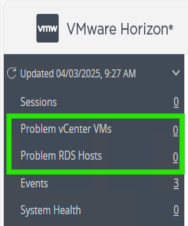
At this stage all Horizon workloads should be powered on and healthy. Review the Problem vCenter VMs for any issues and test provisioning by deleting some instant clone VMs.
Summary
There was some trial and error involved when I initially approached this procedure. The majority of cluster maintenance rarely requires a full power down, so Horizon workloads can be vMotioned between operational hosts. In this instance, we can gracefully shut down all the instant clones. vCenter can manage the vSAN and host power down. There is no need to log on to the hardware until bring-up. I love getting feedback or other tips, so please comment below.
I’ve used the below process several times during failed upgrades or downsizing of a Horizon pod. I’ve become strangely well versed with this procedure after working with a customer using Horizon 2111.2 and seeing various errors during upgrades that gave us no fix-forward choice, despite Omnissa support involvement.
The process combines the Omnissa guidance and some tips from Omnissa GSS.
Before Starting: Check FSMO Schema role owner
This prerequisite ensures you don’t see replication errors between the remaining healthy pod members. This can happen if you were to accidentally uninstall a connection server that was holding the local/global schema roles. If required, seize the role owner to another connection server instance.
Check the configuration and schema role owner and seize it to another connection server
From a connection server instance, open LDP.exe > Connection > Connect > localhost
Connection > Bind > Select Bind as currently logged on user
Click View > Tree > select CN=Schema, CN=configuration from the drop-down menu.
4. Search for the output for the text string “fsMORoleOwner “. The hostname of the owner will be displayed.
5. To seize the role to another connection server, first log onto the server you wish to seize the role.
Run the below command from an elevated command prompt. If the horizon pod has CPA enabled, there will be a Schema master for the local ADAM database. There will also be one for the global ADAM database. Remember to assign both roles to a different server.
6. Disable the connection server in Horizon Administration console by logging into https://ConnectionServer.domain.com/admin > Servers > Connection Servers > select target > Disable
7. Uninstall the components from appwiz.cpl or Add/Remove Programs: Horizon Connection Server, HTML Component, VMwareVDMDS and VMwareVDMDSG.
8. Remove VDM registry keys.
Right click HKLM\Software\VMWare…\VDM> Permissions > Advanced > select ‘Replace all child object permission entries with inheritable permission entries from this object’ > Apply > Ok.
Delete the parent key: HKLM\Software\VMWare…\VDM
9. Open the local Certificate Store > Personal > VMware View Connection Server > Delete all certificates within the store.
10. Reboot the server.
Remove references to unwanted connection server via vdmadmin
11. Use the below vdmadmin command to remove references to the unwanted connection server in the ADAM database. This command must be run from another connection server instance and is case sensitive.
cd C:\Program Files\VMware\VMware View\Server\tools\bin\

vdmadmin -S -r -s <NetBIOSName>
Check replication health
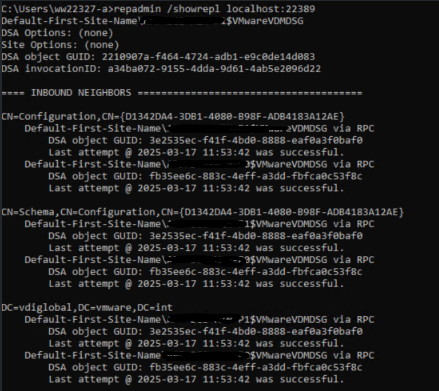
11. From any connection server instance command prompt, check replication health on the local ADAM database. The local ADAM database uses port 389. You can also check the global ADAM database, which uses port 22389.
The output should display replication connections between the existing local pod members, and for CPA, remote pods.
12. Login to the connection server administration console and verify the node has been removed from the list of connection servers.
Summary
After removing the connection server, the installation directory in Program Files will still contain some configuration files. This is intentional. It can be useful if you choose to rebuild the installation. It is also helpful if you need to back up the old configuration.
My tips for saving money, what you’re really paying for, study guide and advice for passing the VCP-DTM 2020 qualification!
The following post covers my personal experience in studying for the Official VMware Certified VCP-DTM 2020, achieved June 2020, the following steps are covered:
Step 1:Consider a vMug Membership
Step 2: Studying for Foundations 6.7 exam
Step 3: VMware Instructor led training [on demand]
Step 4: Preparing and Passing the VCP-DTM 2020 Exam
vMug membership will provide around £650 of overall savings for the DTM certification track and provide resources for a home lab and is a great insurance to have if you fear failing the exam (like I do)…
vMug costs around $200, but do a quick Google for vMug discount codes prior to signing up to save a further 10% on the signup fee.
You save around £550~ on the official VMware instructor-led training [on demand] or In-Class routes.
You get a total of 4x 20% exam discount vouchers – 2x for Foundations 6.7 and 2x for any VCP exam – saving you around £30 per re-sit, if needed. You also receive discounts for VCAP if you’re on that path.
You get evaluation licenses for a broad range of vProducts – including vCenter, Horizon Standard, View Composer and Identity Manager – which covers most of what you’ll need for the DTM route.
Sound great! But what’s the catch?
Bad News: vMug Evaluation licenses DO NOT cover the VCP-DTM 2020 blueprint technologies! Considering VMWare want people to have hands on experience with their products, but won’t let you spin up a lab environment at home to use their latest innovations, I found it pretty disheartening to realise I’d spent $200 but wouldn’t be able to setup a home lab for JMP components:
You will not have evaluation licenses forAppVolumes, Instant Clones, UEM, RDSH Apps – these are only available under a Horizon Enterprise license, vMug only provides you Horizon Standard.
Sort of. You do get evaluation licenses for ESXi, View Connection Server, Identity Manager, View Composer and vCenter Server which will let you build a linked-clone lab environment and this will definitely help you . More on this further down.
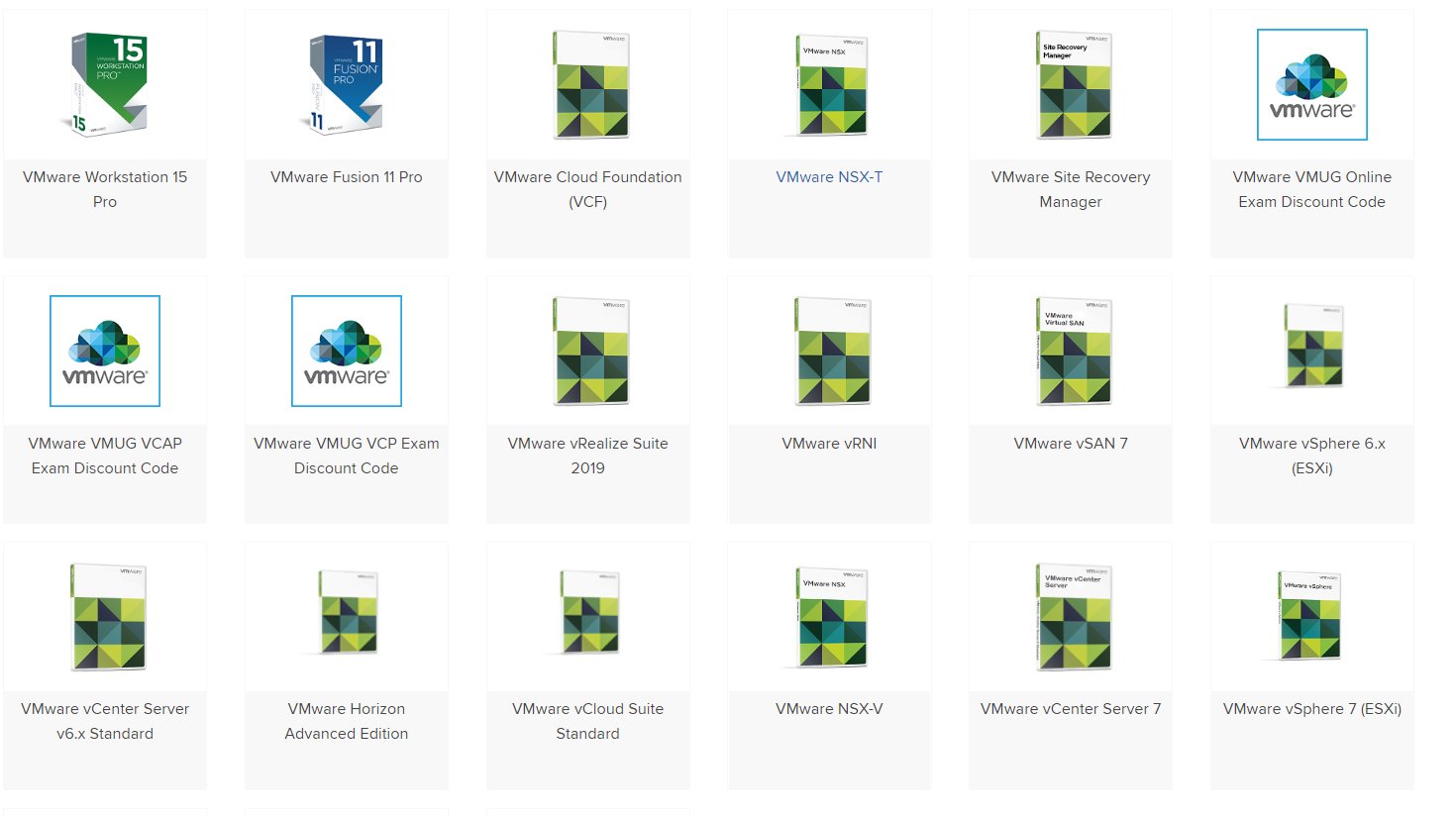
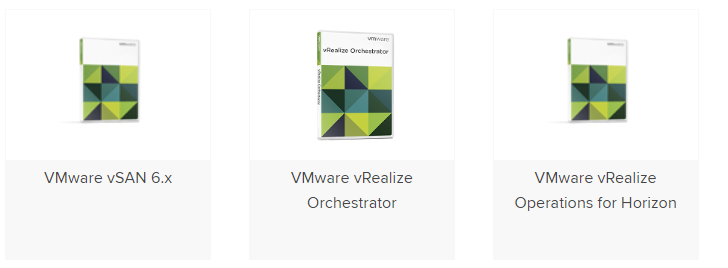
Below pictures of what the software catalogue looks for vMug Advantage members:
It’s worth noting that, you’re experience may be with Horizon, or vROPS, or some other suite of products – but the focus of the Foundations exam is aligned with theVCP-DCV certification path– there are barely any questions on DTM related content. This threw me off (I failed it twice) – so be aware that you basically become ‘primed’ to study for the DCV path by virtue of undertaking the Foundations course.
Naively I had expected the Official Course Guide to provide a decent level of detail for what is covered in the Foundations exam but the book does not cut the mustard. I ended up relying on the below resources far more than the OCG, so below are my recommended study materials in order of preference. Good luck!
Study Materials for vSphere Foundations 6.7 2019
Undoubtedly the best resource you can use if the VMware Knowledge Base ; remember to filter each article by the release version you need. Exam questions are formulated from KB articles, so I recommend prioritising these as your primary material before referencing any related books, websites, third party study guides.
VMware Technical and Whitepapers cover Best Practice, Details Design Documents (DDD’s), Overviews and Explanations of all things VMware. I’d covering each exam topic but equally, taking notes from each paper for real-world application. Ask yourself which vSphere features your current client or workplace utilises and consider the ‘why’ behind each design decision. This’ll make your study a lot more relevant.
VMware Technology Network is a useful forum area moderating by VMware staff and there’s plenty of real world Q&A to reference.
Recommended Study Books
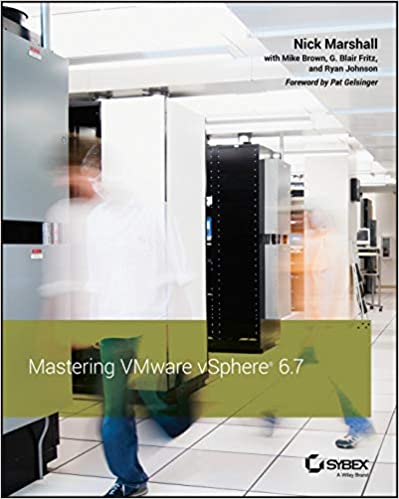
Mastering VMware vSphere 6.7 – Nick Marshall
Useful for: a great deep-dive reference into each feature in vSphere 6.7. Contains implementation steps, explanations and recommended practice for every feature covered in the Foundations exam blueprint.
vSphere 6 Foundations Exam Official Cert Guide – VMware Press
Good for: Giving a primitive understanding of each technology area. However, this book is littered with mistakes – from grammar to incorrect question answers and dodgy screenshots from legacy versions of the web client. It’s written in a conversational tone which is great, but massively let down by its brevity and lazy proofing. I suggest you don’t rely solely on this book (as I did…).
Building A vSphere Home Lab On Your laptop!
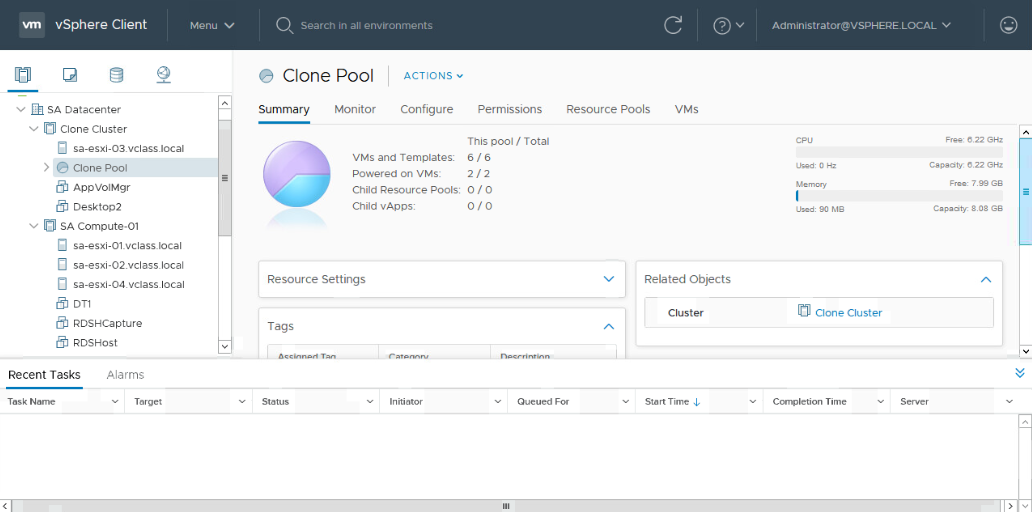
This guide to creating a complete VMWare home lab on your laptop is truly excellent. You build an 2-node vSphere home lab and can run it entirely embedded environment on your home laptop. You may need to buy some more RAM to accommodate it , but it’s money well spent and you can utilize your vMug evaluation licenses to run the latest vSphere components at home! In relation to the exam, it is well worth going through the motions installing and setting up the ‘core’ vSphere and Horizon components – this aids massively for both exams – believe it or not, there’s plenty of exam questions (in Foundations and VCP) focused around what happens during installing or what options/steps are built into the install process.
As a guide, I have a Dell XPS 15 i7, 32gb RAM, 500gb SSD (free space) and was able to run 2xESXi node w/ Composer and Connection server.
Step 3: What is the VMware Horizon 7: Install, Configure, Manage [V7.7] – On Demand training ?
Bearing in mind my experience will give a slight bias to this information – I have around 6 years experience with Linked clones, AppVols, and 1yr with Instant Clones and UEM in large enterprise environments. I personally found the training to be a bit below par considering the cost and I had higher hopes considering this is meant to be the ‘Real McCoy’ training bundle.
I paid £3000~ for the On Demand training, and yes that price included the vMug discount – and yes, I did feel like an absolute vMug for paying that. However, given my employers have paid me good contracting rates for several years, it was a small investment in the grand scheme of things, and I wanted to compare how they perform as a training provider and gauge how much new knowledge would be imparted to me for paying that kind of premium.
Course Delivery
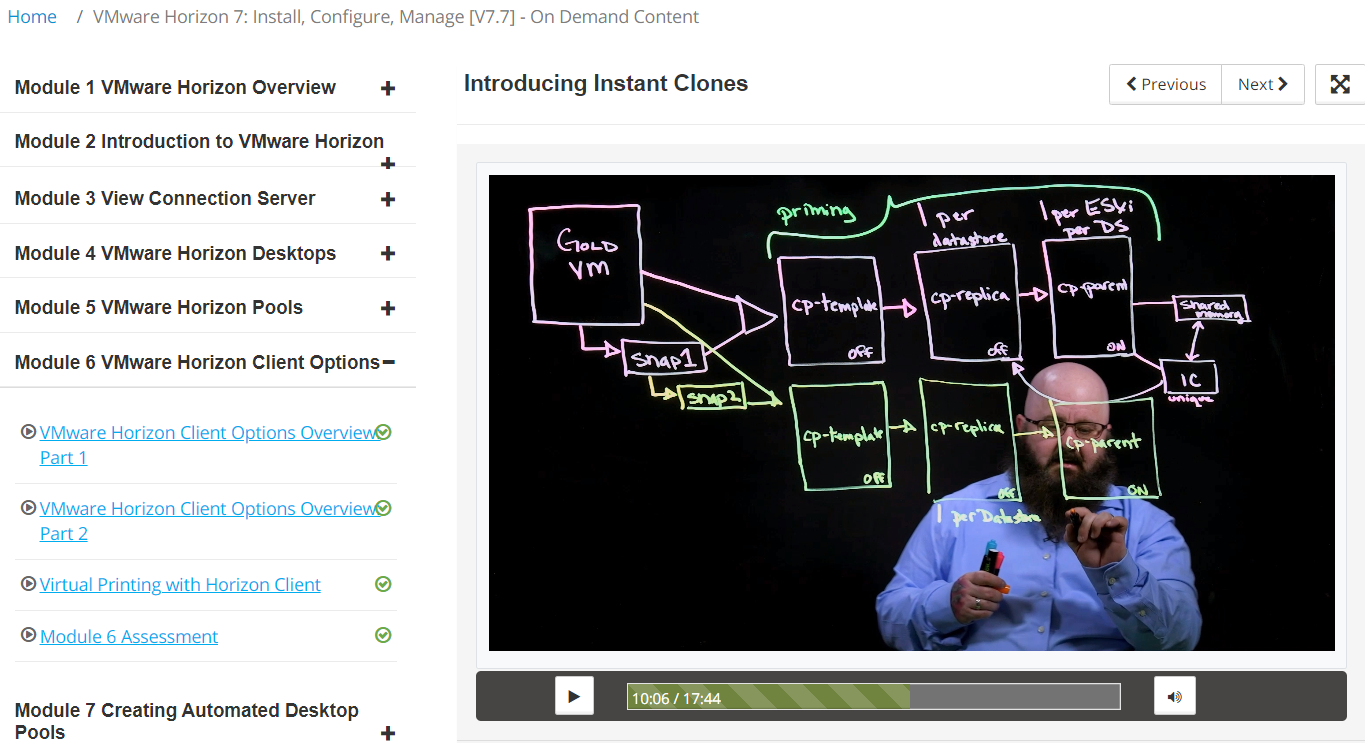
The training modules are hosted on the VMware Learning Zone portal, and broken down into 10-15 min videos with Linus Bourque taking you through (nearly) all components of Horizon, but not all DTM exam topics are covered in the Horizon 7.7 On Demand course. The below screenshot is an example of what to expect.
The delivery is sometimes a bit predictable – the instructor generally parrots what is written down on the slide adding some colour occasionally, however, the slides do cover about 70% of the course in high level, but I’ll reiterate vROPS and Identity Managerare not covered in the trainingor labs. It took me around 16 hours to complete the entire On Demand course.
Assessments
Each module has a few multiple choice questions which do not count towards your qualification. There is a Final Assessment after you complete all the labs and training videos which is covered further down this page.
My opinion?
For the more experienced Horizon admin 5+ years, I think you could skip this and save yourself the expense – but if you’re keen to have the VMware stamp of approval and be ‘fully’ certified, then you’ll have to pay for it. The training does hit the mark for someone with 6 months -1 year hands on experience of Horizon, which is what it’s geared for – you’ll get a good overview of the features of Horizon, what it can do, how it operates and you can walk away with that ‘how can I apply this at work?’ feeling.
For the more experienced administrator, I would avoid paying for it at it’s current price . Particularly if you can combine a home lab setup (for View Composer, Linked Clones) with real world experience in an enterprise. Personally, I will be avoiding paying for anymore VMware training for future VCP certifications. I preach as short sermon on my opinion of vendor training in general at the bottom of the article.
What are the On Demand lab exercises like?
When you give away £3k you half expect to be granted some decent learning experiences in return , after all, the fee is equivalent to 1 term at university – so what do you get?
A vSphere environment with RDSH hosts, AppVolumes Manager, UEM and Win10/Win7 VM’s for creating Linked and Instant Clone pools.
This covers around 70% of what you need to study for the certification, but it doesn’t have any infrastructure for Identity Manager and vRealize Operations Manager – more on this later.
The tasks set during the labs are basic and anyone with 1-2 years experience will have already performed 99% of what is asked of you. Some example tasks include – installing the Horizon Agent into a master image, running OSOT to optimize the OS, create an AppStack and assign it, create an Instant Clone and Linked Clone pool, install UEM (now DEM) and test it – in short, much of the bread and butter tasks to stand up a Horizon environment.
Room for improvement?
Yes. If you want to give customers value for money, I would expect more real-world tasks to be included in the training (isn’t that the idea?). It’s also disappointing that vROPS and vIDM isn’t covered at all in the training or the labs – but accounts for about 30% of the exam? In general, the labs cover installing the components but not ‘from scratch’ as its target audience may have expected. Typically the server or manager element for a service is already setup, and you’re tasked with installing and configuring the agent component into a desktop. If VMware took the time to add a few extra steps to their existing walk through’s it would build a richer learning experience, and I think they fall short on this.
Suggestions for improving the labs
-Install and configure View Composer – create a DB and ODBC, install Composer, point it to the DB, link it to vCenter. This would help prime te understanding of the high level steps needed to configure other Horizon component likeAppVols, vCenter, View Connection Server.
-vROPS and Identity Manager are completely ignored. There is zero information in both the training and labs that covers Identity Manager or vRealize Operations Manager. The exam blueprint includes these topics but you are you’ll have to use the free VMware Hands On Labs (HOL) to familiarise yourself with these technologies and read the KB articles around installation and configuration.
-The DEM (UEM) labs should include how to create predefined settings, writing application templates, how to use the application profile tool and configuring Horizon Smart Policies, to name a few.
-How to update an AppStack and edit it’s properties to mount on different OS’s – valuable for techies involved in OS migration projects!
-How to create an instant clone RDSH farm and app delivery mechanism.
What is the VMware Horizon 7: Install, Configure, Manage [V7.7] – On Demand Assessment?
At the end of the On Demand training course there is a ‘Final’ assessment – don’t be worried by the ‘finality’ of it – it’s a 95 question assessment which repeats all of the questions from the earlier end of module tests – so you’re answering questions you’ve already experienced! Bonus: for each question you have the opportunity to correct your answer twice, so there’s a pretty low chance of failing this, but if you passed each end of module assessment without trouble, you will be fine. As far as I am aware, it can count towards being VMware Certified.
Step 4. Prepare and Pass the VMware Professional Horizon 7.7 Exam to achieve VCP-DTM 2020 Certified Status
If you’ve paid for the On Demand training course, you will receive a free attempt to sit the exam. If you choose not to undertake the training then you’ll need to schedule the exam through Pearson Vue and pay $250 per take. If you fail, you have to wait 7 days before your next resit.
Is the On Demand training enough to sit the exam immediately after completing it?
No it’s not, before you start revising for VCP-DTM 2020, watch the video series: Horizon 7.7 Professional Exam Prep in the VMWare Learning Zone. The video cites numerous VMware papers to reference for revision and as a silver lining, the presenter makes several exam question slips along the way .
My usual tact is to read the ‘Install/Configure/Overview-flavour’ KB articles of the given topic and make notes from these and then refer to books and third party study guides to reinforce your notes. Also, try to image the type of exam question that could be formulated from the KB article you’re reading.Equally, VMware can’t test people deeply on technologies that aren’t easily accessible through vMug or an evaluation license – in our case Instant Clones, AppVolumes, UEM and RDSH – so work within these limitations by not pouring hours into the edge-case issues or configurations – because it’s likely it won’t get covered. Remember it’s a Professional level cert, not Expert/Architect/Specialist.
I would personally recommend trying to answer the following questions for each technology area in the blueprint, and also refer to the ‘By the end of the training candidates should be able to‘ list which is available alongside the blueprints for the training courses (not the exam blueprint). This list is included in my study notes (highlighted yellow bullets) available below.
For example, for AppVolumes:
What are the OS and database minimum requirements for install and/or any pre-requisites?
How do you install the manager/agent and what does a typical/custom/complete installation include?
How do you perform routine operations (e.g. creating, updating, deleting an appstack).
What are a few typical troubleshooting issues you might come across with this technology whilst installing/configuring it OR whilst deploying/using it? e.g. Appstack not mounting, what happens when a user vs computer assignment conflicts, writable volumes not attaching and so fourth, what causes the agent component to fail connecting to manager/server, and so forth.
I hope you’ve found this article useful in deciding whether to study the VCP DTM 2020. This concludes the article, but below are my thoughts on vendor training and how it could be improved. If you have an opinion on that, I would be keen to hear it
The following is not targeted at VMware , but IT vendors in general and their training methods. Most enterprise IT vendors have a team of staff with 100’s of years of combined experience between them; so why do the customers and learners continue to be subject to unimaginative examination and training experiences? Can you remember an Associate, Professional or Administrator level certification that gave you raw, technical skills that you were able to apply at work? I can’t. It’s pretty unimaginative and lazy in 2020 to be expecting people to memorise minimum requirements or what steps are correct to perform action X? – It risks the brand reputation and risks losing your target audience’s interest in the vendor/technology/IT, so why do vendors continue to fall into this trap? What purpose does memorising a bunch of settings serve that is not replaced by Google?
A thought; we live in the attention economy, so getting 100% of someones attention to read your course guides, study your products and write about it online (the irony is not lost on me) is massively valuable – look at the click bait industry! IT vendors have willing participants who will voluntarily pay to indulge in their product developments, buy their books and pour hours of energy into the hope it will give them cutting edge skills – so why do vendors not capitalise on this? Training presents an opportunity to convert a learner/customer into an ambassador/salesman/woman but only if the recipient receives what they are looking for or what they have paid for – real world, bill-paying skills. If vendors took time to tap into their in-house support functions and correlate what common problems they see with their products, understand what real world customers are doing with their tech and how it addresses business needs, then ask themselves, how can we incorporate this into our training? that would be a good start.
I feel there is a gaping void in the lower-tier certs to address this and I’m yet to study a cert from any vendor that has broken this mould. I can’t speak for VCAP, CCNP, MCSE, CCEE level certs as I haven’t worked on these yet (and my expectations are already marred – see the problem?). The age of the Pavlovian memory games must end!













 All things IT, EUC and Virtualization
Leave a comment